When a new investment deal is launched on your Investor Display platform, you are eligible to create a new investment for that deal. Before proceeding, please ensure that you have thoroughly reviewed all the terms and conditions associated with the investment.
Generally, the investment process will be similar across deals, although there may be slight differences depending on the specific deal. Each investment process provides a guided, step-by-step workflow to make it easy for investors to complete their subscription. As part of the process, you will also be required to sign the subscription agreement via DocuSign, which serves as a binding contract for your investment. This will be sent to your email automatically upon completing the investment process.
Sign NDA #
- Login to your InvestorDisplay account
- On your dashboard, click “Create new investment” OR navigate to the “Deals” page on the main menu
- Locate the deal you want to invest in and click “Invest Now” to proceed straight to the guided investment process. Alternatively, you may click “More Details” to read further information on the deal and check supporting documentations.
- Sign and Agree to the NDA. This only will occur the first time you are investing in that particular deal

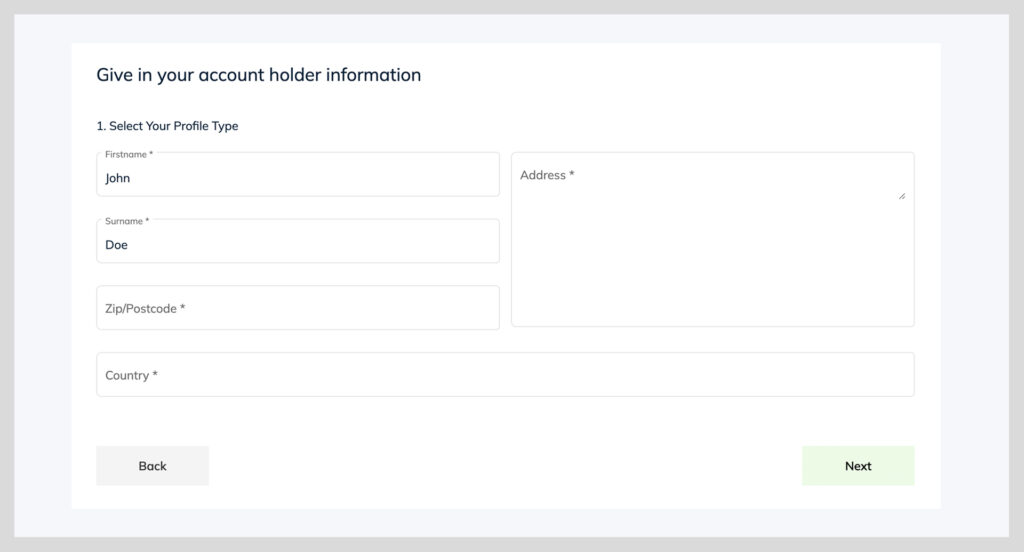
Step 1: Account Holder Information (For new users) #
If you are creating your first investment, you will first need to complete your Account Holder informations. Follow the steps and add in the following details:
- Select your profile type (male/female/joint account/company/trust) – This determines what AML’s will be required for your investment
- Enter in your address information – This should be the same as what will be displayed on your Proof of Address document (address of residency)
- Click “Next”

Step 2: Identity Verification (For new users) #
- Select which type of identity verification document will be provided (passport/national ID/Drivers license)
- Upload your AML documents – For more information on AML requirements, visit this link
- Click “Next”


Step 3: Sign the NDA (Required on first investment) #
- Click “I understand and I accept the above terms”
- Click “Next”

Step 4: Investment Details #
- Select the “Currency” and “Amount” of the investment
- Input your “Source of Funds” and “Occupation”
Once your investment amount has been entered, you will see a preview of your investment projection until maturity (Disclaimer: This is only a projection, and calculations may slightly differ dependent on your investment contract)

Step 4: Add Bank Details #
- Select an existing bank detail to assign to the investment. This account will be where redemptions will be paid into. OR add new bank details by clicking “Add new account”
- Click “Next”

Step 5: Review All Investment Details #
- Recheck all the investment data you have just entered in through steps 1-4. If all information is accurate and true, please continue to click “Next”

Step 6: Sign Agreements via Docusign #
- A subscription Agreement will automatically deploy to your registered email address. It will require to sign via DocuSign.
- Click on the email notification from DocuSign, and complete the signing process.
- Once you have signed all documentations, your investment is now pending in your account.

Final Steps: #
- Your investment is now under review. All documentations will be checked and validated. All AML’s will be reviewed and confirmed. If there are outstanding items, it will be communicated to your nominated agent.
- Remit funds to the assigned bank details of the Investment Deal.
- Once all documentations are complete, and funds are received, your investment will become LIVE.